





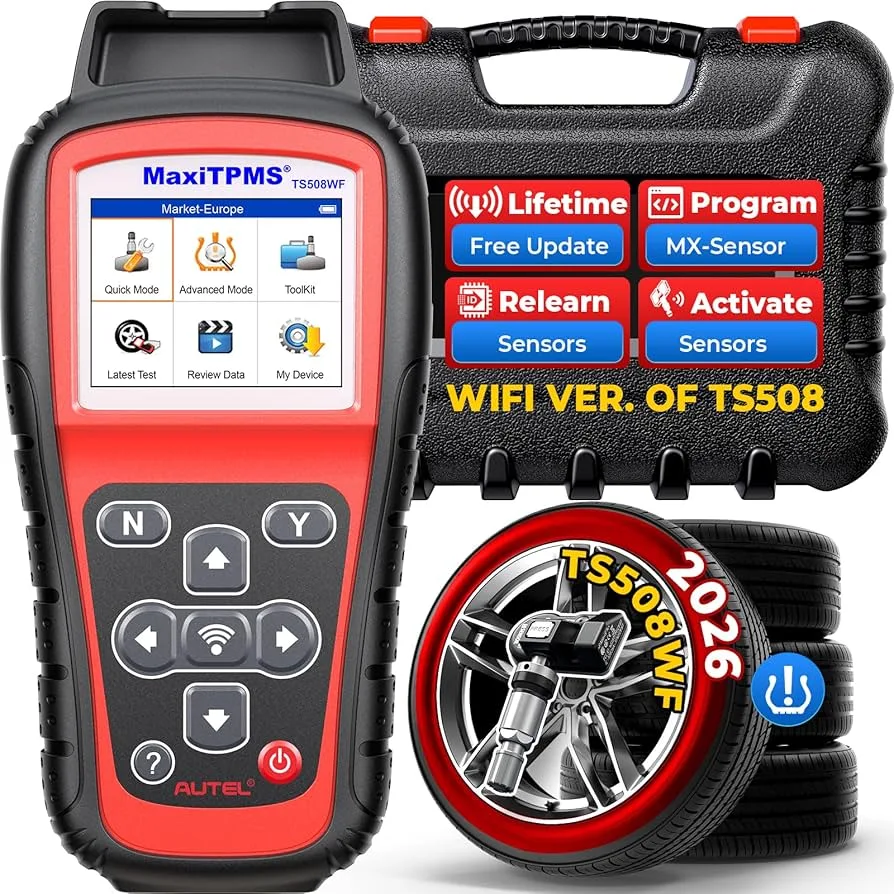
What Is a TPMS Scan Tool?
A TPMS scan tool is a diagnostic device specifically designed to communicate with tire pressure monitoring sensors and the vehicle’s TPMS control module.
Unlike a standard OBD-II scanner that reads engine codes, a scan tool for TPMS can:
- Activate tire pressure sensors
- Read individual sensor IDs
- Display live tire pressure and temperature
- Check sensor battery status
- Perform TPMS relearn procedures
- Register new sensors in the ECU
- Reset TPMS warning lights properly
It works both wirelessly (via radio frequency activation) and through the vehicle’s OBD-II port.
Not all scan tools support TPMS. This is a crucial distinction.
Understanding How TPMS Works
Before understanding the tool, you must understand the system.
There are two types of TPMS systems:
Direct TPMS
Each wheel contains a battery-powered sensor that measures tire pressure and transmits data wirelessly to the vehicle. This system requires a TPMS scan tool for diagnostics and programming.
Indirect TPMS
Uses ABS wheel speed sensors to estimate tire pressure based on rotation differences. No physical pressure sensors inside the tires.
Most modern vehicles use direct TPMS, especially in North America.
How a TPMS Scan Tool Works
A scan tool with TPMS capability operates in two modes:
1. RF Sensor Activation Mode
The tool emits a low-frequency signal near the tire valve stem. This “wakes up” the sensor. The sensor then transmits:
- Tire pressure
- Internal temperature
- Sensor ID number
- Battery condition
The tool displays this data instantly.
2. OBD-II Communication Mode
After reading sensor data, the tool connects to the vehicle’s OBD-II port to:
- Write new sensor IDs into the ECU
- Perform relearn procedures
- Clear TPMS diagnostic trouble codes
- Confirm successful programming
This two-way communication is what separates a true TPMS scan tool from a basic code reader.
TPMS Scan Tool vs Standard OBD-II Scanner
This is where many vehicle owners get confused.
Standard OBD-II Scanner:
- Reads engine fault codes
- Clears check engine light
- Displays basic live engine data
- Cannot activate TPMS sensors
- Cannot program sensor IDs
Scan Tool for TPMS:
- Activates sensors via RF
- Reads sensor IDs and pressure
- Performs relearn procedures
- Programs new sensors
- Diagnoses TPMS-specific faults
If your tool does not have an RF antenna, it cannot properly service TPMS.
What Is a Scan Tool With TPMS Capability?
A true scan tool with TPMS functionality includes:
- RF antenna for sensor activation
- OBD-II programming ability
- Sensor relearn support
- Compatibility database by make/model
- Firmware updates
Entry-level OBD scanners do not include these features.
Can You Reset TPMS With Scan Tool?
This is one of the most searched questions.
Can you reset TPMS with scan tool?
Yes — but only if the scan tool supports TPMS relearn functions.
Simply clearing codes does not fix:
- Dead sensor batteries
- Unregistered new sensors
- ID mismatches after tire rotation
A proper reset involves either:
- Relearn procedure
- Sensor reprogramming
- ID registration
How to Reset TPMS With Scan Tool (Step-by-Step)
Here is the professional process.
Step 1: Connect the Tool
Plug into the OBD-II port. Turn ignition to ON position.
Step 2: Select Vehicle Information
Choose:
Make → Model → Year → TPMS System
Step 3: Read Sensor Data
Activate each sensor at the wheel using the RF antenna. Confirm:
- Pressure reading
- Sensor ID
- Battery status
If a sensor does not respond, it may be dead.
Step 4: Perform Relearn Procedure
There are three common relearn types:
- Auto relearn (drive cycle)
- Stationary relearn
- OBD relearn
Follow on-screen instructions.
Step 5: Confirm Light Is Cleared
If successful, the TPMS warning light will turn off.
Can a Scan Tool Reset TPMS Without Replacing Sensors?
If sensors are functional and IDs are correct, yes.
If a sensor battery is dead, no tool can fix it. The sensor must be replaced and programmed.
Toyota TPMS Scan Tool Guide
Toyota vehicles often require OBD ID registration. This is why “tpms scan tool toyota” is frequently searched.
Many Toyota models:
- Do not auto-learn new sensors
- Require manual ID entry via scan tool
- Use Techstream-compatible protocols
A proper Toyota TPMS scan tool must support:
- OBD relearn
- Sensor ID registration
- Sensor cloning (if using universal sensors)
Without OBD programming, Toyota TPMS reset may fail.
Toyota TPMS Scan Tool Procedures
Typical Toyota process:
- Activate each sensor and record IDs
- Replace defective sensors
- Connect scan tool to OBD
- Register new sensor IDs
- Confirm relearn completion
Toyota systems are strict about ID matching.
Can OBD II Scan Tool Cen-Tech Functions Reset TPMS?
Another common question.
Most basic Cen-Tech OBD-II tools:
- Read engine codes
- Clear engine codes
They typically do not:
- Activate TPMS sensors
- Perform relearn
- Register new IDs
Therefore, in most cases, no — a basic OBD II scan tool cannot properly reset TPMS.
You need a scan tool with TPMS capability.
Types of TPMS Relearn Procedures
Understanding relearn methods is critical.
1. Auto Relearn
Drive vehicle for 10–20 minutes at specified speed. ECU automatically detects sensors.
Common in domestic vehicles.
2. Stationary Relearn
Vehicle enters learn mode. Sensors activated in sequence (usually LF → RF → RR → LR).
3. OBD Relearn
Scan tool writes sensor IDs directly into ECU.
Common in Toyota and many Asian brands.
Programming Aftermarket Universal TPMS Sensors
Universal sensors must be programmed before installation.
Steps:
- Use TPMS scan tool to read original sensor ID
- Clone ID into universal sensor
- Install new sensor
- Perform relearn
If cloning is not supported, OBD ID registration is required.
When You Actually Need a TPMS Scan Tool
You need one if:
- TPMS light flashing
- Replaced a sensor
- Installed new wheels
- Rotated tires and light stays on
- Vehicle will not auto-relearn
- Multiple sensors replaced
Modern vehicles make this tool almost mandatory for tire service.
Common TPMS Problems Identified With a Scan Tool
1. Dead Sensor Battery
Sensor does not respond during activation.
2. ID Not Registered
Sensor transmits but ECU rejects ID.
3. Weak Signal
Intermittent data, often due to aging battery.
4. Wrong Frequency
315 MHz vs 433 MHz mismatch.
Scan tool reveals all these instantly.
Sensor Frequency Considerations
North America commonly uses:
- 315 MHz
European imports often use:
- 433 MHz
Your TPMS scan tool must support correct frequency range.
How Long Do TPMS Sensors Last?
Most sensors last 7–10 years.
The battery is sealed inside and cannot be replaced.
Scan tools help identify weak batteries before total failure.
TPMS Fault Codes Explained
Common TPMS diagnostic trouble codes include:
- No signal detected
- Sensor not learned
- Low battery
- Communication fault
- Receiver module failure
A proper scan tool for TPMS decodes these clearly.
Why TPMS Lights Flash
A flashing TPMS light usually indicates:
- System fault
- Communication failure
- Multiple sensor malfunction
Solid light usually indicates low tire pressure.
Scan tool confirms which issue is present.
Why Cheap TPMS Tools Fail
Low-cost tools often:
- Lack full vehicle coverage
- Cannot perform Toyota OBD relearn
- Do not support cloning
- Have limited update capability
Professional tools cost more because of software support and vehicle database access.
TPMS Scan Tool Features to Look For
When buying a scan tool with TPMS, ensure it includes:
- Wide vehicle coverage
- Toyota compatibility
- OBD relearn support
- Sensor cloning
- Battery voltage detection
- Live pressure and temperature data
- Regular software updates
Avoid tools that only clear TPMS codes.
Real-World Diagnostic Scenarios
Scenario 1: TPMS Light After Tire Rotation
Cause: Position mismatch.
Fix: Perform stationary relearn with scan tool.
Scenario 2: One Tire Shows 0 PSI
Cause: Dead sensor battery.
Fix: Replace sensor and register new ID.
Scenario 3: TPMS Light Returns After Clearing
Cause: Sensor ID not properly registered.
Fix: Perform OBD relearn.
Can You Drive With TPMS Light On?
Yes, but it is not recommended.
Risks include:
- Underinflated tire
- Reduced traction
- Increased tire wear
- Blowout risk
Diagnose properly with scan tool.
TPMS Scan Tool vs Dealer Software
Dealer-level tools:
- Provide full factory access
- Cost significantly more
Aftermarket professional TPMS tools:
- Provide 90% of capability
- More affordable
- Cover multiple brands
Independent shops rely heavily on these.
Final Thoughts: Is a TPMS Scan Tool Worth It?
If you:
- Replace your own TPMS sensors
- Own multiple vehicles
- Operate a tire shop
- Work on Toyota vehicles
- Install aftermarket wheels
Then yes.
A tpms scan tool is no longer optional in modern automotive diagnostics.
Without it, you cannot:
- Properly program sensors
- Diagnose TPMS faults accurately
- Complete relearn procedures
- Reset warning lights correctly
As vehicles become more electronically integrated, TPMS servicing becomes more technical.
A true scan tool with TPMS capability gives you complete control over tire pressure monitoring diagnostics.
Connect with us


