





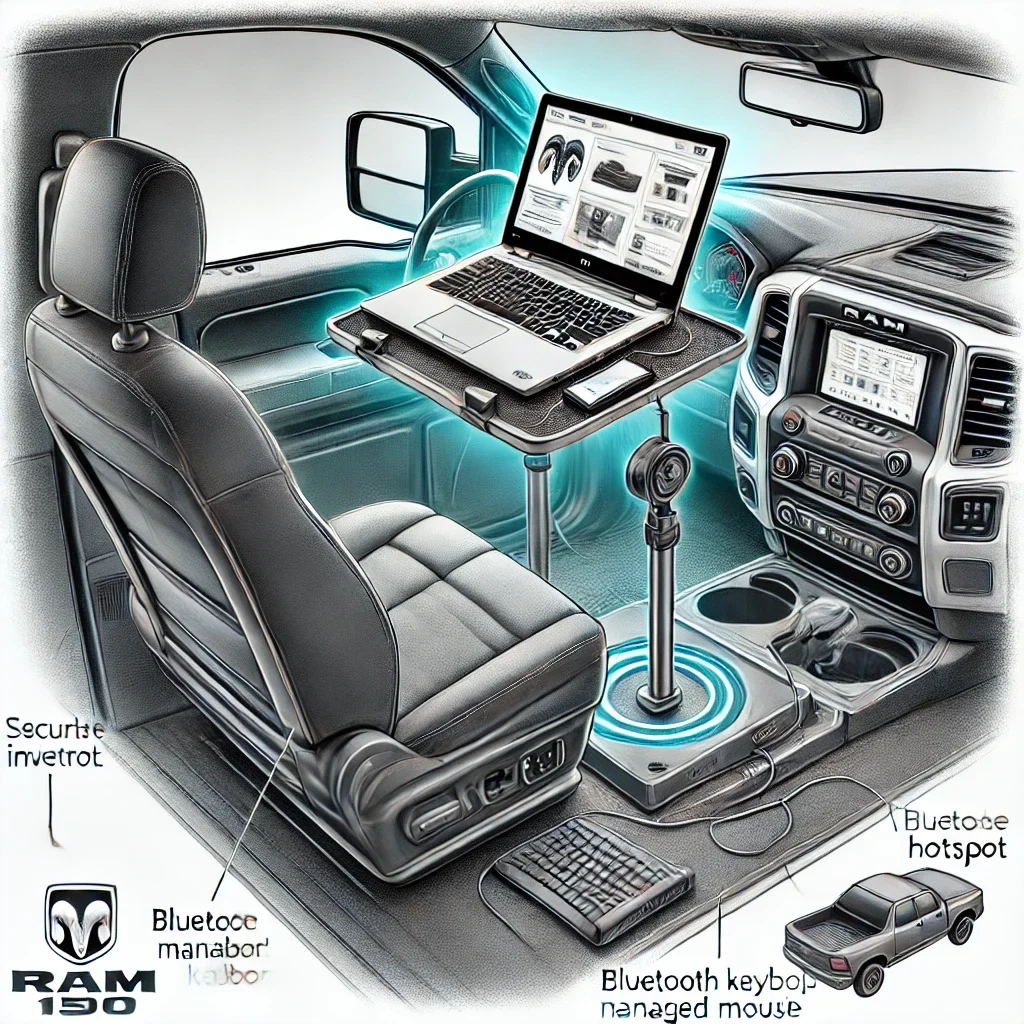
Turning your RAM 1500 into a mobile office is a game-changer for anyone who needs to stay productive while on the move. Whether you’re a business professional, a contractor, or simply someone who enjoys the flexibility of working from different locations, having a fully equipped mobile workstation can drastically enhance your efficiency. With the right setup, you can manage work tasks, access important files, or even enjoy some entertainment during downtime—all from the comfort of your truck. The process of integrating a computer into your RAM 1500 is not only straightforward but also highly customizable, allowing you to create a setup that meets your specific needs.
Imagine being able to handle conference calls, draft reports, or update project plans right from your vehicle, whether you're parked at a job site or taking a break on a scenic drive through California. Beyond work, this setup can also serve as a powerful navigation tool or an entertainment hub for long trips, making your RAM 1500 a versatile space for both productivity and leisure. The key to a successful setup lies in selecting the right equipment, securing it properly, and ensuring you have reliable power and connectivity.
Here’s a comprehensive step-by-step guide to help you transform your RAM 1500 into a fully functional mobile office. From choosing the right laptop mount and power supply to organizing cables and ensuring safety, each step is designed to make your setup efficient and secure. By following these guidelines, you’ll be able to create a workspace that not only meets your professional needs but also enhances your overall driving experience. Whether you’re navigating the urban landscape of Los Angeles or venturing into the wilderness, your mobile office will be ready to support you every step of the way.
1. Choosing the Right Equipment for Your RAM 1500 Mobile Office
Transforming your RAM 1500 into a fully functional mobile office starts with selecting the right equipment. Ensuring you have the best tools not only enhances productivity but also guarantees safety and efficiency while working on the go. Here’s a detailed breakdown of the essential components you’ll need:
Laptop or Tablet: Your Digital Command Center
The centerpiece of your mobile office is your computing device. Whether you choose a laptop or a tablet, it should meet your performance and portability needs.
Key Considerations:
- Performance Needs: Select a device with enough processing power to handle your tasks. For business users, a laptop with a powerful processor, sufficient RAM, and a solid-state drive (SSD) ensures smooth multitasking and fast performance. For casual tasks or light work, a high-quality tablet can also suffice, especially if equipped with productivity apps.
- Battery Life: Mobile work requires a device with excellent battery life. Laptops and tablets with long-lasting batteries reduce the dependency on external power sources and provide flexibility, especially during long work sessions.
- Durability: Opt for a rugged or well-built device that can withstand the rigors of being on the road. Devices with shockproof features or protective cases can be beneficial in preventing damage from bumps or drops.
Recommended Devices:
- Laptops: Lightweight ultrabooks or business laptops like the Dell XPS series or MacBook Air offer a good balance of performance, portability, and battery life.
- Tablets: The Apple iPad Pro or Microsoft Surface Pro provide the versatility of a tablet with the power of a laptop, making them great for on-the-go productivity.
Laptop Mount: Ensuring Stability and Accessibility
A secure and adjustable laptop mount is essential for setting up a mobile office in your RAM 1500. This ensures your device is accessible and stable, even when driving on uneven terrain.
Benefits of a Vehicle-Specific Mount:
- Safety and Convenience: A vehicle-specific mount, like the RAM® No-Drill™ Laptop Mount, is designed specifically for RAM 1500 trucks, ensuring a snug fit without the need for drilling into your vehicle. This not only preserves the integrity of your truck but also simplifies installation.
- Adjustability: The mount’s telescoping pole and dual articulating arms allow you to adjust the height and angle of your laptop, ensuring an ergonomic setup. This flexibility is crucial for maintaining a comfortable working posture and preventing strain during extended use.
- Durability: High-quality mounts are built to withstand the vibrations and movements of the truck, keeping your laptop secure and steady. This is particularly important for maintaining productivity during travel.
Installation Tips:
- Position the mount on the passenger seat bolts using the provided hardware.
- Adjust the arms to position the laptop within easy reach, ensuring it doesn’t obstruct your view or interfere with vehicle controls.
- Use the included straps or clamps to secure the laptop firmly to the mount.
Power Supply: Keeping Your Devices Charged
A reliable power source is crucial for maintaining your mobile office’s functionality, especially for longer trips or extended work sessions.
Factory-Installed Power Inverter:
- Many RAM 1500 models come equipped with a 115V power inverter, typically located under the passenger seat or in the center console. This built-in feature allows you to plug in standard AC devices, including laptops and chargers, directly into your truck.
- The convenience of a factory-installed inverter means you can start using your mobile office setup immediately without additional modifications.
Aftermarket Power Inverter:
- If your RAM 1500 doesn’t have a built-in inverter, an aftermarket solution like the Wagan SlimLine 1500-watt AC Power Inverter is an excellent choice. This inverter provides ample power for running laptops, charging multiple devices, and even powering small peripherals like printers or portable monitors.
- Installation: Connect the inverter directly to your truck’s battery or through the 12V power outlet. Ensure it’s securely mounted in a safe location, such as under a seat or in the center console area.
- Multiple Outlets: Aftermarket inverters often come with multiple AC outlets and USB ports, allowing you to power several devices simultaneously.
Additional Considerations:
- Cable Management: Organize power cords using cable ties or clips to prevent tangling and ensure a neat setup. This also minimizes the risk of cables interfering with vehicle controls.
- Power Monitoring: Be mindful of your power usage to prevent draining your truck’s battery. Using the inverter while the engine is running helps maintain battery charge and provides consistent power to your devices.
2. Installing the Laptop Mount
Installing a laptop mount in your RAM 1500 is a crucial step in creating a functional and secure mobile office. A properly installed mount ensures that your laptop is stable, easily accessible, and safe, allowing you to work efficiently without compromising safety. Here’s a detailed guide on how to install the mount:
Step 1: Prepare the Mount
Before starting the installation, it’s essential to get familiar with all the components of the laptop mount.
- Unpack the Mount: Carefully unpack the mount from its packaging. It typically includes a base plate, telescoping pole, dual articulating arms, a laptop tray, and necessary mounting hardware.
- Inspect Components: Check all parts for any signs of damage or missing pieces. Familiarize yourself with each component, understanding how they fit together.
- Read the Instructions: Refer to the manufacturer’s instructions for specific details about your particular mount model. This ensures you follow the correct procedure and utilize all parts correctly.
Step 2: Attach the Base
The base is the foundation of the laptop mount, securing it to the vehicle.
- Locate the Passenger Seat Bolts: Find the bolts on the passenger side seat rails. These bolts are easily accessible and serve as the anchor points for the mount.
- Loosen the Bolts: Using a wrench or socket, loosen the seat bolts just enough to slide the base plate under them. Be careful not to completely remove the bolts unless necessary.
- Position the Base: Slide the base plate under the loosened seat bolts. Ensure the base is aligned properly, providing a stable platform for the mount.
- Retighten the Bolts: Once the base is positioned correctly, retighten the bolts securely. Ensure they are tightened enough to prevent any movement of the base during driving.
Step 3: Adjust the Pole and Arms
The telescoping pole and articulating arms allow you to customize the mount’s height and angle for optimal usability.
- Attach the Telescoping Pole: Secure the telescoping pole to the base using the provided hardware. Adjust the pole’s height by extending or retracting it, ensuring the laptop will be at a comfortable viewing and typing level.
- Install the Articulating Arms: Connect the dual articulating arms to the top of the telescoping pole. These arms provide flexibility, allowing you to adjust the laptop’s position horizontally and vertically.
- Fine-Tune the Placement: Adjust the arms to position the laptop tray in the ideal spot. The goal is to have the laptop within easy reach and at eye level, reducing strain during use.
Step 4: Secure the Laptop
With the mount fully assembled and adjusted, it’s time to secure the laptop.
- Place the Laptop on the Tray: Carefully position your laptop on the tray. Ensure it sits flat and is balanced properly to avoid tipping or sliding.
- Use Straps or Clamps: Most mounts come with straps or clamps designed to hold the laptop in place. Secure the laptop using these mechanisms, making sure it’s tightly fastened.
- Test Stability: Gently shake the mount and the laptop to ensure everything is secure. The laptop should remain stable, with no significant movement, even when driving on uneven terrain.
Tips for Optimal Installation
- Double-Check All Connections: Ensure every bolt, screw, and clamp is tightly secured to prevent any loosening during travel.
- Adjust for Comfort: Spend time adjusting the laptop’s position for comfort, ensuring you can type and view the screen without strain.
- Test Before Driving: Once installed, test the setup while the vehicle is stationary. Ensure you can comfortably reach and operate the laptop without compromising safety.
- Regular Maintenance: Periodically check the mount for any loosening or wear. Tighten any loose components to maintain stability over time.

3. Setting Up Power and Connectivity
To ensure your mobile office runs smoothly, it’s crucial to have a reliable power source and internet connectivity. Here’s a detailed guide to keeping your computer powered and connected while on the go:
Power Supply Options
Using the Built-In Inverter
Many RAM 1500 models come equipped with a factory-installed 115V power inverter, typically located under the passenger seat or within the center console. This built-in inverter allows you to easily charge your laptop and other devices:
- Locate the Inverter: Check your truck’s manual or inspect the interior for the 115V outlet, which resembles a standard wall outlet.
- Plug in Your Laptop Charger: Simply plug your laptop’s power adapter into the 115V outlet. This provides a steady power source for running your laptop during stationary use or while driving.
- Multiple Device Charging: In addition to your laptop, you can charge other small devices like tablets or smartphones, making this a versatile power solution.
Installing an Aftermarket Inverter
If your RAM 1500 doesn’t have a built-in inverter, you can install an aftermarket inverter to provide the necessary power:
- Choose the Right Inverter: Select an inverter that suits your power needs. The Wagan SlimLine 1500-watt AC Power Inverter is a robust option, capable of powering laptops and other electronic devices.
- Mount Securely: Install the inverter in a convenient, secure location, such as under a seat or within the center console. This keeps the inverter accessible but out of the way.
- Connect to the Battery: The inverter connects to your truck’s battery, either directly or through the 12V power outlet. Ensure the connection is secure to prevent power interruptions.
- Plug in Your Devices: Once installed, you can plug your laptop and other devices into the inverter’s AC outlets, providing reliable power on the go.
Cable Management
Managing your cables effectively is essential for maintaining a tidy and safe setup:
- Use Cable Organizers: Keep your power and data cables neat with cable organizers or sleeves. This reduces clutter and makes it easier to manage your setup.
- Velcro Straps or Adhesive Clips: These are excellent for securing cables to surfaces, preventing them from dangling or interfering with vehicle controls.
- Avoid Damage: Properly secured cables are less likely to get caught, pinched, or damaged, which ensures your equipment remains functional and your setup stays organized.
Internet Connectivity
Reliable internet access is a key component of a mobile office. Depending on your needs and location, there are several ways to stay connected:
Mobile Hotspot
A dedicated mobile hotspot device offers reliable and secure internet access:
- Portable and Versatile: Mobile hotspots can be easily moved between vehicles and locations, providing consistent internet wherever you are.
- Data Plans: Choose a data plan that suits your usage needs, especially if you frequently work from different locations.
Smartphone Tethering
Many smartphones support tethering, allowing you to use your phone as a hotspot:
- Activate Hotspot Feature: In your smartphone settings, enable the hotspot feature. Connect your laptop to the network just like any Wi-Fi connection.
- Consider Data Limits: Be mindful of your mobile data plan’s limits to avoid overage charges, especially when using tethering for extended periods.
Built-In Wi-Fi
Some RAM 1500 models come with a built-in Wi-Fi hotspot feature:
- Subscription Service: This feature often requires activation through a subscription service. Check with your dealership or manufacturer for details on setting up and activating the service.
- Seamless Integration: A built-in Wi-Fi hotspot offers a convenient and integrated solution, providing reliable internet for your mobile office setup.
4. Enhancing the Setup for Productivity and Safety
Ergonomics and Comfort
Setting up your computer in the RAM 1500 isn’t just about functionality; it’s also about ensuring comfort and preventing physical strain, especially if you plan to work for extended periods. Proper ergonomics play a crucial role in maintaining productivity and preventing discomfort or injury.
Adjust the Laptop Mount
To achieve a comfortable typing and viewing angle, carefully adjust the laptop mount:
- Height Adjustment: Position the laptop screen at eye level to avoid straining your neck. This reduces the risk of developing neck or shoulder pain from prolonged downward viewing.
- Angle and Distance: Tilt the laptop screen slightly to reduce glare and position it at a comfortable arm’s length. This ensures a natural posture, minimizing the strain on your wrists and eyes.
- Typing Comfort: Ensure the keyboard is positioned in a way that allows your hands to rest comfortably, with your wrists straight and supported.
By optimizing these factors, you can create a more comfortable and efficient workspace, reducing the risk of fatigue and discomfort during extended use.
Safety Considerations
When integrating a computer setup into your RAM 1500, safety should always be a top priority.
Use While Parked
- Avoid Operating While Driving: Using a computer while driving is dangerous and often illegal. It can divert your attention from the road, increasing the risk of accidents. Always operate your computer when the vehicle is parked and safely stationary.
- Park in a Safe Location: If you need to work, find a safe place to park, such as a rest area, parking lot, or other designated spots. This ensures you can focus on your tasks without endangering yourself or others.
Secure All Equipment
- Prevent Movement: Ensure all components, including the laptop mount and the computer, are securely fastened. Loose equipment can become a hazard, especially if you need to make sudden stops or turns.
- Regular Checks: Periodically check the stability of your mount and the security of your laptop to ensure everything remains properly fastened.
Additional Accessories
To enhance your mobile office setup, consider adding a few accessories that can improve comfort, productivity, and functionality.
Bluetooth Keyboard and Mouse
- Ergonomic Benefits: A Bluetooth keyboard and mouse allow you to type and navigate more comfortably, especially if you find the laptop’s built-in keyboard and touchpad restrictive. Position the keyboard and mouse in a way that supports natural wrist posture.
- Flexibility: These peripherals offer greater flexibility in positioning, helping you create a more ergonomic workspace tailored to your needs.
External Monitor
- Larger Display: For those who need more screen real estate, a portable monitor can be a game-changer. It provides additional space for multitasking, making it easier to work on multiple applications or documents simultaneously.
- Connectivity: Most portable monitors connect via USB or HDMI, making setup simple and quick. Ensure your laptop has the necessary ports or consider using a docking station for additional connectivity options.
By incorporating these accessories, you can significantly enhance the functionality and comfort of your mobile office, making your time in the RAM 1500 as productive and pleasant as possible.
5. Maintaining Your Mobile Office
To ensure your mobile office setup in the RAM 1500 remains functional, efficient, and safe, regular maintenance is essential. A well-maintained setup not only enhances productivity but also prolongs the lifespan of your equipment and reduces the risk of technical issues. Here’s how to keep your mobile office in top shape:
Routine Checks
Consistent inspections are crucial for maintaining the stability and reliability of your setup.
Check the Mount’s Stability
- Tighten Loose Components: Over time, vibrations from driving can cause the mount’s bolts and screws to loosen. Periodically check the mount to ensure all components are secure. Tighten any loose parts to maintain stability and prevent movement while driving.
Inspect Power Cables and Connections
- Look for Wear and Tear: Regularly inspect all power cables and connections for signs of fraying, wear, or damage. Damaged cables can lead to power interruptions or pose safety hazards. Replace any worn-out cables promptly.
- Ensure Proper Connection: Check that all power and data cables are securely connected and free from tangles. Proper cable management helps prevent accidental disconnections and ensures consistent power and data flow.
Software Updates
Keeping your software up-to-date is critical for maintaining smooth performance and security.
Update the Operating System
- Install Updates Regularly: Operating system updates often include important security patches, performance improvements, and new features. Regularly check for and install updates to keep your laptop running efficiently and securely.
Update Applications and Drivers
- Ensure Compatibility: Regular updates to your applications and hardware drivers ensure they remain compatible with your system and function optimally. This helps prevent glitches, crashes, and compatibility issues, which can disrupt your workflow.
Cleaning and Organization
A clean and organized workspace is essential for maintaining a professional and efficient environment.
Clean Your Equipment Regularly
- Remove Dust and Debris: Dust buildup can affect the performance of your laptop, keyboard, and other peripherals. Use a soft, lint-free cloth or a can of compressed air to clean your equipment regularly, focusing on vents, keyboards, and screens.
Organize Your Workspace
- Minimize Clutter: Keep your workspace tidy by organizing cables, peripherals, and other accessories. Use cable ties, organizers, or clips to prevent tangling and clutter. An organized workspace enhances productivity by reducing distractions and making it easier to find what you need.
Conclusion
Setting up a computer in your RAM 1500 turns your truck into a versatile and powerful mobile office, giving you the ability to work, navigate, and stay entertained no matter where you are. In today’s fast-paced world, having a dedicated workspace that travels with you is more than a convenience—it’s a necessity for staying productive on the go. Whether you’re managing important business tasks, staying connected during a long road trip, or using advanced navigation tools for your next adventure, your RAM 1500 can become an all-in-one hub for efficiency and connectivity.
The transformation starts with selecting the right equipment. A sturdy and adjustable laptop mount ensures that your computer is securely positioned, providing easy access while keeping safety a priority. This allows you to maintain a professional setup without sacrificing the comfort and functionality of your vehicle. The right mount also minimizes vibrations and movements, offering a stable platform whether you’re parked or stationary at a job site.
Reliable power is another crucial component of your mobile office. The RAM 1500 often comes equipped with a built-in power inverter, making it easy to keep your devices charged and operational. If your truck doesn’t have this feature, an aftermarket inverter can provide the necessary power for your laptop and other accessories. Coupled with strong internet connectivity—via a mobile hotspot or your smartphone’s tethering capability—you’ll have everything you need to stay connected, manage emails, participate in virtual meetings, and access cloud-based files with ease.
This setup not only enhances productivity but also offers unmatched convenience for entertainment purposes. Whether streaming your favorite shows during a break or using advanced mapping software for navigation, your RAM 1500 becomes a dynamic space that adapts to your needs. For those looking to maximize their vehicle’s capabilities, Simi Valley Chrysler Dodge Jeep Ram provides expert advice and a wide range of accessories to help you optimize your truck for both work and play. Visit us to explore the best tools and setups that can elevate your driving experience and keep you connected wherever the road takes you.
FAQs on Setting Up a Computer in Your RAM 1500
1. Can I set up a computer in my RAM 1500 without professional help?
Yes, you can set up a computer in your RAM 1500 yourself with the right equipment and guidance. This includes installing a laptop mount, securing power, and organizing cables.
2. What type of laptop mount should I use for my RAM 1500?
A no-drill, vehicle-specific laptop mount, such as the RAM® No-Drill™ Laptop Mount, is recommended for a secure and convenient setup.
3. Is it safe to use a laptop while driving?
No, using a laptop while driving is unsafe and may be illegal. Always use your laptop when the vehicle is parked safely.
4. Can I power my laptop using the built-in power outlets in the RAM 1500?
Yes, many RAM 1500 models come with a built-in 115V power inverter, which is suitable for charging laptops and other devices.
5. What if my RAM 1500 doesn’t have a built-in power inverter?
You can install an aftermarket power inverter, which connects to your vehicle’s battery and provides the necessary power for your devices.
6. How can I ensure my laptop stays secure on rough terrain?
A high-quality laptop mount with adjustable arms and secure straps will keep your laptop stable and safe, even on rough roads.
7. How do I manage cables to keep my setup tidy?
Use cable organizers, Velcro straps, or adhesive clips to keep power cords and data cables neat and out of the way.
8. Can I use a mobile hotspot for internet connectivity?
Yes, a mobile hotspot or your smartphone’s tethering feature can provide reliable internet access for your laptop on the go.
9. What type of laptop is best for a mobile office in a RAM 1500?
A lightweight laptop with good battery life, robust processing power, and a durable build is ideal for mobile use in a vehicle.
10. Is it possible to add a second monitor to my setup?
Yes, portable monitors can be connected via USB or HDMI, providing additional screen space for multitasking.
11. How do I ensure my computer setup doesn’t drain my truck’s battery?
Use your setup primarily when the engine is running, or invest in a power management system to monitor and prevent battery drain.
12. Can I use a tablet instead of a laptop in my RAM 1500?
Yes, tablets can also be mounted securely and offer many of the same functionalities as laptops, depending on your needs.
13. Are there specific mounts designed for tablets?
Yes, there are tablet mounts specifically designed for vehicle use, which can be adjusted for optimal viewing and accessibility.
14. How do I protect my laptop from extreme temperatures inside the truck?
Keep your laptop in a protective case when not in use and try to park in shaded areas to avoid overheating. Also, avoid leaving it in the vehicle during extreme weather conditions.
15. Can I charge other devices, like phones or cameras, simultaneously?
Yes, with a multi-port power inverter or USB charging hub, you can charge multiple devices at once.
16. Is it legal to modify my RAM 1500 for a mobile office setup?
Yes, adding a laptop mount and power solutions is generally legal, but ensure the modifications don’t obstruct your view or impede driving.
17. Can I use voice commands to control my laptop while driving?
Some laptops and connected devices support voice commands, but it’s safest to use these features only when parked.
18. How do I maintain my mobile office setup?
Regularly check the stability of the mount, ensure cables are in good condition, and clean the equipment to prevent dust buildup.
19. Can I use a gaming laptop in my RAM 1500 setup?
Yes, but ensure the power requirements of the gaming laptop are compatible with your truck’s power supply to avoid overloading the inverter.
20. Where can I get expert advice on setting up my RAM 1500 as a mobile office?
Visit Simi Valley Chrysler Dodge Jeep Ram for personalized advice and a wide selection of accessories to help you create the perfect mobile office setup in your RAM 1500.